 Panda ELDFMCSA
Your logs are ready before the officer asks.
An FMCSA-registered electronic logging device and logbook app for US carriers. It plugs into the diagnostic port, records driving time on its own, and keeps working when the signal doesn't.
- Off duty
- Sleeper
- Driving
- On duty
Illustrative log. Not live fleet data.
What a bad log actually costs
Carriers rarely shop for an ELD until something goes wrong at the roadside. These are the federal maximums a carrier is exposed to when records are wrong, late or missing.
- Maximum civil penalty per hours-of-service violation, charged to the carrier$19,246
- Maximum per violation charged to the driver$4,812
- Per entry where falsification is knowing$15,846
- Per day for incomplete or inaccurate records, capped at $15,846$1,584
Maximums under 49 CFR Part 386, Appendix B, as adjusted for inflation on 19 February 2026. A driver who cannot produce records for the day of inspection and the seven days before it can be placed out of service under 49 CFR 395.13, and the 2026 revision to CSA scoring doubled the weight carried by out-of-service findings. Penalties are assessed case by case; these are ceilings, not the amounts issued.
Four warnings before a violation
Most ELDs tell a driver they are already in violation. Panda ELD notifies the driver and the safety office one hour, thirty minutes, fifteen minutes and five minutes before one happens. An hour is the difference between choosing a truck stop and taking whatever shoulder is available.
- 1 hrDriver and office both notified
- 30 minEnough range to pick a stop
- 15 minEnough range to reach one
- 5 minLast call
- ViolationWhat the other four prevent
An inspection, start to finish
No printer, no binder, no hunting for last Thursday.
-
01
The officer asks
Federal rules require the current day and the seven days before it. That is the window the app keeps ready at all times.
-
02
Transfer or display
Logs move electronically, and the screen can be shown directly when that is what the officer prefers. Physical printouts are not required.
-
03
48-hour follow-up
An officer may request further information by email or fax within 48 hours of the inspection. The records are already in the portal.
-
04
The office sees the same thing
Every duty change, edit and certification is in the portal, which is where a compliance review starts if one follows.
What the office sees
Duty status, location, fuel level and speed for every vehicle, with remaining hours beside each driver and anyone already in violation pulled to the top.
| Unit | Status | Drive | Shift | Cycle | Location |
|---|---|---|---|---|---|
| 104 | Violation | 0:00 | 0:00 | 6:15 | I-80 near Elko, NV |
| 218 | Driving | 3:18 | 5:02 | 24:40 | I-70 near Hays, KS |
| 311 | On duty | 8:45 | 10:20 | 41:05 | Dock, Joliet, IL |
| 402 | Sleeper | 11:00 | 14:00 | 33:30 | TA, Ontario, CA |
| 417 | Off duty | 11:00 | 14:00 | 52:10 | Yard, Morganville, NJ |
- A
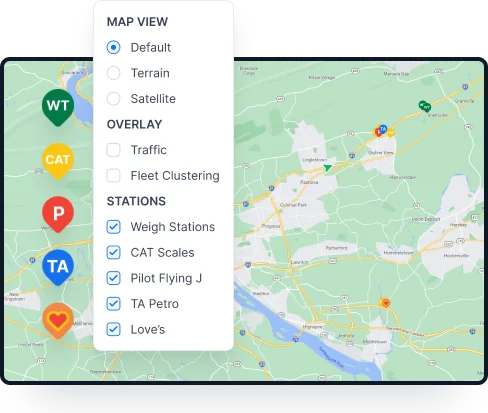
Map filters
Traffic, vehicle grouping, and the nearest weigh station, CAT Scale or truck stop.
- B
Weather
Rain and snow layers, so a route gets planned around a storm rather than into one.
- C
Shared tracking
Give a broker or shipper a live vehicle location and stop fielding calls about arrival times.
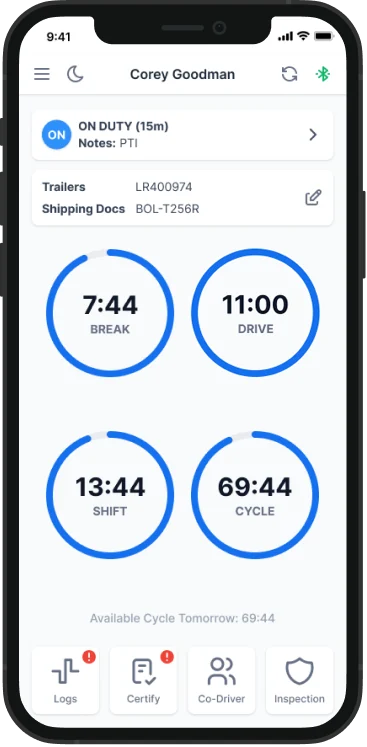
What the app does on the truck
Driving time records automatically once the phone or tablet is paired over Bluetooth and the vehicle passes 5 mph.
- 01
Roadside compliance
Logs transfer electronically and display on screen. Nothing needs printing.
- 02
Records and audits
Monitor and maintain records, with e-log flexibility when a correction is needed.
- 03
Bulk certify
Certify past uncertified records in one action instead of one day at a time.
- 04
Night mode
A darkened interface for night driving that also saves battery on the device.
- 05
Driver messaging
Send messages, images and files to drivers directly through the app.
- 06
Document scanner
Scan a BOL or a receipt from the cab without a second app.
DVIRs, filed electronically
Drivers create inspection reports in the app and fleet managers read them in the portal. The eDVIR final rule published in February 2026 confirmed that these may be created, signed and kept electronically alongside hours-of-service records, so the paper copy is no longer the record of account.
- 01
Created
In the app, by the driver, at the point of inspection.
- 02
Read
In the portal, by whoever handles maintenance and compliance.
The device and what it fits
Plug it into the diagnostic port, enter the MAC address printed on the device, and the pairing is done.
- 01
Ports
6-pin, 9-pin and OBD-II.
- 02
Mack and Volvo
Cable harnesses for trucks built after 2013. Y-cables ship with the device.
- 03
Data use
About 100 MB a month, against the 1–10 GB most cellular plans carry.
- 04
Offline
Device and app both run without a signal. A connection is needed to back up or share logs.
Pricing
| Feature | Base$59.99per truck, per month | Premium$79.99per truck, per month |
|---|---|---|
| Logbook, DVIR, fleet portal, GPS tracking, IFTA reporting | IncludedIncluded | IncludedIncluded |
| Money-back guarantee | IncludedIncluded | IncludedIncluded |
| Logbook monitoring | — Not included | IncludedIncluded |
| 24/7 support | IncludedIncluded | IncludedIncluded |
Get the app
Drivers install it on the device they already carry. The office works from the portal in a browser.
Questions drivers actually ask
Is your ELD FMCSA certified?
Yes. In line with the FMCSA's ELD mandate, the Panda ELD compliance solution is registered and certified with the FMCSA.
Do I have to print my logs?
No. Logs transfer electronically and can be shown on screen. An officer may still request additional information by email or fax within 48 hours of the inspection.
Will it fit my truck?
In most cases yes. It connects to standard 6-pin, 9-pin and OBD-II diagnostic ports, and harnesses are available for Mack and Volvo trucks built after 2013.
Does it need cellular data?
Not to run. Both the device and the app work offline. A connection is needed to back up data or share logs, and a data plan is recommended for everyday use.
How is driving time recorded?
Automatically, once the driver's device is paired to the ELD over Bluetooth and the vehicle is registered in the app. A vehicle counts as in motion above 5 mph.
Will it work on a phone?
It will. A tablet is the better screen for a full day of use, but the app runs on either.
Talk to someone who runs this every day
Tell us what you are running now and what is not working. A demo takes about as long as a coffee stop.
- Emailinfo@pandaeld.com
- WhatsApp+1 732 387 7777
- Phone+1 732 387 7777
- Support hours24 hours a day, 7 days a week
- Mailing addressPanda ELD MBR, 345 Deerfield Rd, Morganville, NJ 07751